
Reverse image location search: when it works, and what to use when it doesn't
Reverse image location search finds where a photo was taken only when a copy of that image, or a page that describes it, is already on the web. When that search comes back empty, read the EXIF GPS if the original file still has it, and otherwise estimate the place from the pixels, then verify the candidate before you trust a pin.
Reverse image search looks for copies of a picture online. Reverse image geolocation estimates where the scene is from the picture itself, with no web lookup.
Three ways to find where a photo was taken, compared
EXIF, reverse image search, and pixel-based geolocation answer the same question and fail in different places. EXIF needs the original file. Reverse image search needs a copy an index has already seen. Pixel-based geolocation needs the scene. All three still need a person to check the result.
| Method | What it needs | What it returns | Where it fails | What to check next |
|---|---|---|---|---|
| EXIF | The original file, with GPS still attached | Coordinates written into the file, when present | Stripped uploads, screenshots, and edited metadata | If there is no GPS, reverse-search the image |
| Reverse image search | An indexed copy, or a distinctive crop of one | Matching pages, and a place name when a page carries one | Never-posted, cropped, screenshot, mirrored, or generic images | If nothing useful matches, use the pixels |
| Pixel-based geolocation | The pixels. No EXIF and no web index | Ranked candidates, each with a confidence radius | No source page. No person identification | Check the candidate on satellite imagery and Street View |
Verification is required for all three. In practice:
- Reverse-search the image. If the photo may already be online, search it. A match links to a page, and any place name comes from that page.
- Read the EXIF GPS. If you still have the original file, check it for GPS. Many uploads have had that metadata removed, and a screenshot never had it.
- Estimate the place from the pixels. If there is no indexed copy and no GPS, use a pixels-only geolocator. GeoInfer returns ranked candidates with a confidence radius.
- Verify the candidate. Compare the candidate with satellite imagery and Street View before you rely on it.
How reverse image location search works
You upload a picture. The engine compares it with images and pages already indexed. A returned place comes from the matching page: a caption, a landmark, a pin someone else added, or a product listing.
Google Lens
Use Google Lens for a landmark, for text in the frame, or for a product. Search with an image on Google is Google's help article for that search. A result is similar pages and, sometimes, a place those pages name. A never-posted photo has no indexed copy to point at. The Google Lens comparison sets that matching task next to a pixels-only estimate.
TinEye
Use TinEye for exact copies and the earliest indexed upload. A never-posted original has no copy to find. TinEye documents the product in its FAQ.
Bing and Yandex
Bing Visual Search and Yandex Images are further reverse-image indexes. This page does not rank them. A hit is a lead to a page, not a coordinate. Microsoft documents Bing in Using Bing Visual Search. Yandex documents image search in its images help.
Why reverse search returns nothing
Reverse search returns nothing when the index has nothing useful to match. The usual cases:
- Never posted. The file is only on a phone, in a newsroom, or in a private message.
- Cropped. A tight crop can remove the part other pages indexed.
- Screenshot. The pixels no longer match the original file, and the screenshot never had its metadata. See Geolocate a screenshot.
- Mirrored. A flip is enough for an exact-match engine to miss the file.
- Generic. A beach, a highway, or a plain room may match nothing to a place.
An empty result means this index had no useful copy. If you still hold the original file, read the EXIF. If you do not, estimate the place from the pixels. The longer walkthrough, from metadata through a manual check, is How to geolocate a photo.
Pixel-based geolocation: the step after a no-match
When reverse search finds no copy and the file has no GPS, the remaining signal is the scene. GeoInfer is one trained model that reads it from the pixels alone. It uses no EXIF, runs no reverse image search, makes no web search, calls no agents and consults no external database. The EXIF header is discarded. It proposes where the scene is, so it works on a photo that was never posted.
What GeoInfer reads
It reads architecture, terrain, vegetation, and infrastructure. It does not read signs or text. There is no OCR and no label recognition.
What the output looks like
The output is ranked candidates, each with a confidence radius. On the API, POST /v1/prediction/predict accepts top_n from 1 to 15. The default is 5. Each returned cluster includes radius_km. A global call costs 1 credit. You can try a prediction in the browser with no account on Find photo location.
How accurate it is
The home page accuracy curve reports the global model on the IM2GPS3k benchmark:
| Distance | Accuracy |
|---|---|
| Within 1 km (street) | 50% |
| Within 25 km (city) | 61.20% |
| Within 200 km (region) | 78.93% |
| Country | 93.3% |
Half the time the top candidate is within 1 km of where the photo was taken, and the country is right 93% of the time. Every result shows a confidence radius, so you know how far to trust it.
For street-level work, the high-accuracy regional model reaches 97% within 1 km in the areas it covers, at 3 credits a call. Vetted institutions get it on Pro, with on-prem deployment and audit trails: talk to us.
Worked example
One photo, sent once on 24 October 2026. This is a single example, not a typical accuracy figure.
The photograph is St Patrick Street (Triq San Patrizju) in Valletta, Malta. No sign or text in the frame names the place. The Wikimedia Commons file records the camera position as 35.89898594, 14.50991071. That point on OpenStreetMap.
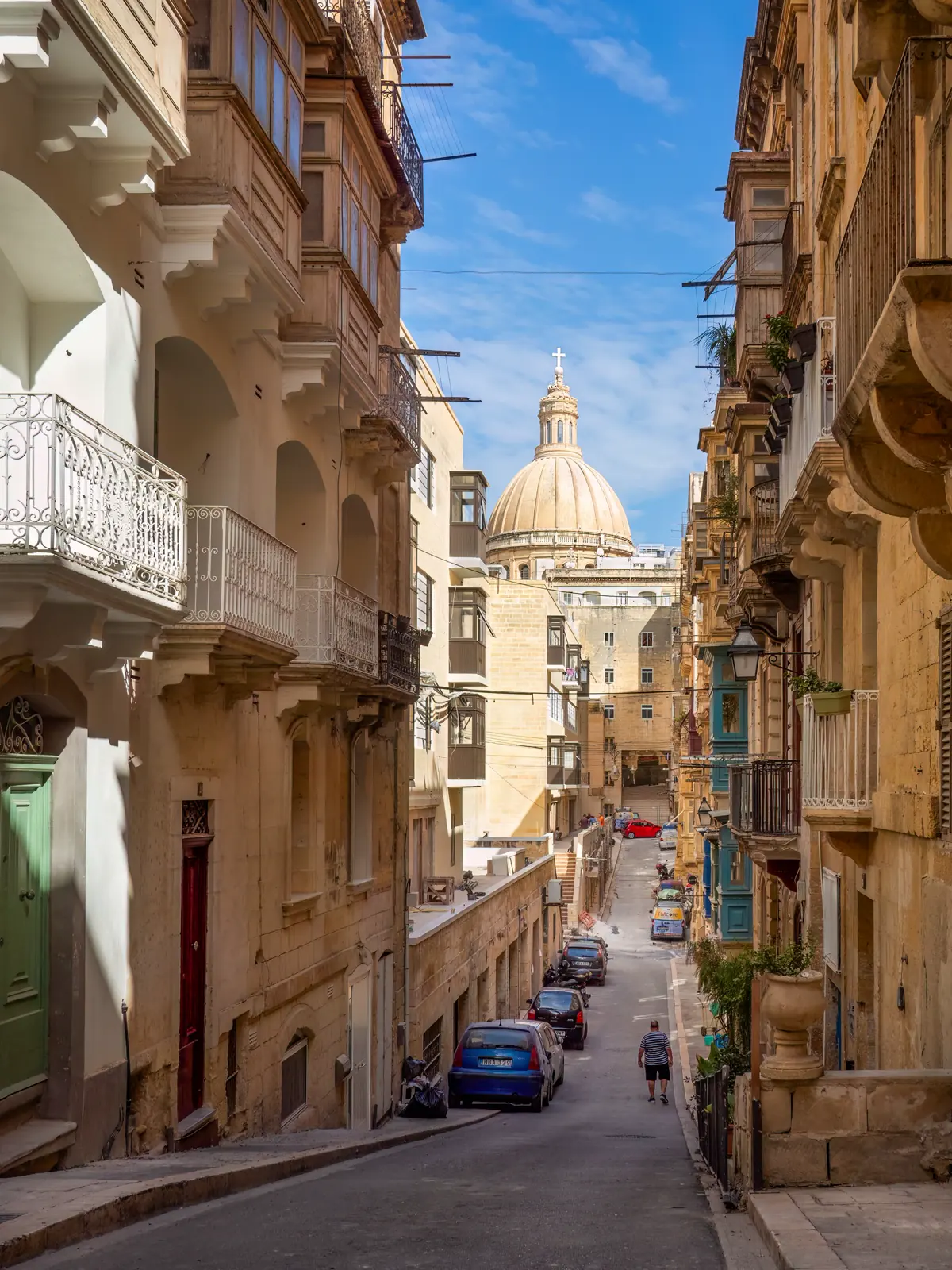
The resized file was sent once to the default global model, global_v4_1. The call used the pixels only. The top cluster was centred at 35.9008, 14.4592 and labelled Birkirkara, Malta, with a radius of 29.66 km. That point on OpenStreetMap. Birkirkara is next to Valletta. The centre is about 4.6 km from the true spot, inside that radius of about 30 km. The result did not name Valletta.
The other clusters on the same call, in the order returned:
| Rank | Label | Distance from the true spot |
|---|---|---|
| 1 | Birkirkara, Malta | about 4.6 km |
| 2 | Noto, Sicily | about 127 km |
| 3 | Cairo, Egypt | about 1,689 km |
| 4 | Pietraperzia, Sicily | about 175 km |
| 5 | Motta Sant'Anastasia, Sicily | about 173 km |
Verify before you trust any pin
Check the pin before you publish it or treat it as evidence. Compare the candidate with satellite imagery, and with Street View where that coverage exists. Shadows can support or contradict a guess about direction and time of day. They are a check, not a coordinate.
For a news or viral photo, start with Verify a news photo. Newsrooms can follow the journalism workflow. Africa Check's guide and Bellingcat's how-to guides cover locating a place from a photo. InVID and WeVerify are verification toolkits for inspecting an image. They do not replace the location check.
The acceptable-use policy says a result should not be the sole evidence where the consequences are serious, unless someone has checked it independently. A wider note on OSINT geolocation tools is in AI OSINT geolocation tools in 2026.
When not to use it
Do not use GeoInfer to find a person. It has no facial recognition, does not identify people, and does not track individuals across images. The acceptable-use policy bans stalking, unauthorized surveillance, and doxxing; identifying or tracking activists, journalists, or human rights defenders for repressive purposes; and geolocating a private image without consent. If the photo is private and you do not have that consent, stop. See also No facial recognition.
FAQ
Can reverse image search find where a photo was taken?
It can, when an indexed copy's page names a place. A never-posted photo, or a search with no useful match, does not. Use EXIF if the original file still has GPS, or a pixels-only estimate if it does not, and verify the result.
Why does Google Lens show no location?
Lens shows a place when an indexed page, a landmark, or another result carries one. It shows none for a never-posted photo, a crop, a screenshot, a mirror, or a generic scene. Check the EXIF next, or estimate the place from the pixels.
What if TinEye finds 0 matches?
TinEye looks for exact copies. Zero matches means it found no indexed copy of that file. Read the EXIF GPS if you still have the original. Otherwise estimate the place from the pixels and verify the candidate.
Is reverse image geolocation the same as reverse image search?
No. Reverse image search looks for copies online. Reverse image geolocation estimates the place from the picture. GeoInfer does the second, and it does not return the page a photo was copied from.
Does GeoInfer search the web?
No. GeoInfer is one trained model. It uses no EXIF, no reverse image search, no web search, no agents and no external database. The EXIF header is discarded.
Does it work on screenshots?
It can. A screenshot has no EXIF, and an exact-match search often misses it. The scene is still in the pixels. Outdoor frames give the model more to work with than a tight indoor crop.
How accurate is AI geolocation?
On IM2GPS3k, GeoInfer lands within 1 km 50% of the time, within 25 km 61.20%, within 200 km 78.93%, and gets the country right 93.3%. In the areas it covers, the high-accuracy model reaches 97% within 1 km.
Can I use it to find a person?
No. GeoInfer has no facial recognition, does not identify people, and does not track individuals across images. The acceptable-use policy bans stalking, unauthorized surveillance, doxxing, tracking activists or journalists for repressive purposes, and geolocating a private image without consent.